
what bolt is the torque gun on?
smart tool knows.
solutions - track - smart tool
Simple, smart, patented AI camera-based tool tracking for multiple tool types. No more expensive smart arms, RFID tags, or other hocus-pocus methods trying to figure out where your tools are. Net Runner with Smart Tool is all you need.
• 100% On-Premises • No Cloud • Runs on Net Runner
THE problem
inspection shouldn’t stop at the station.
Fixed cameras and monitors work great — until the job requires an operator to move, handle the part, or look somewhere other than a screen.

eyes on the monitor, not on the part
Every glance back at a screen breaks focus and slows the cycle. Results are only useful if the operator actually sees them in time.

fixed cameras can’t follow the work
Large parts, rework stations, walk-around checks and audits don’t fit neatly in front of a mounted camera.

instructions live somewhere else
Binders, wall postings and separate screens mean operators stop working to find out what to do next.
how it works
Proven Net Runner tech.
Now mobile.
Net Mobile is built on Net Runner features that have been running on plant floors for years. The mobile device acts as a Wi-Fi camera, Net Runner does the inspection, and the results come right back to the device.
The operator
Vuzix Glasses, phone or tablet
Any Android device with a camera and Wi-Fi, running the Net Mobile app.

Live video - The device camera streams to Net Runner as a standard RTSP IP camera.
Control - Net Mobile uses Net Runner’s REST interface to pick which nets to run and to start Streaming.
Results - Net Runner streams the detections back to the device — the same view you see on the PC.
On your network
net runner
Your on-premises PC running the same AI nets you built in Net Builder.

All traffic stays on your local Wi-Fi network — nothing goes to the cloud
01
CONNECT
Launch Net Mobile on the mobile device and connect to Net Runner over Wi-Fi.
02
CHOOSE A NET
Select the desired Detect-It net. Net Runner opens it and starts streaming results.
03
INSPECT
Point the mobile device at the part. Detections, pass/fail and instructions appear on the mobile device’s display.
04
SWITCH JOBS
Close the dock from the device and pick a different net — no trip back to the PC.
WHAT THE OPERATOR SEES
THE SAME VIEW AS THE PC SCREEN.
IN THEIR LINE OF SIGHT.
Whatever Net Runner shows on the computer screen is exactly what streams to the mobile device. That means your existing scripts and logic can put messages directly in front of the operator.
- Live detections with bounding boxes and labels
- Pass / fail results the moment the part is inspected
- Work instructions and next-step prompts driven by Net Runner scripts
- Custom messages and logic — anything your scripts display
control
run it. right from the your device.
On Vuzix smart glasses, operators navigate Net Mobile three ways. On phones, tablets and other Android hardware, they simply tap the on-screen buttons.

physical buttons
Use the buttons built into the glasses frame to move between controls and select.

side touchpad
Swipe and tap on the touchpad along the side of the glasses.

paired phone
Connect the glasses’ companion app on your phone and control Net Mobile from there.

switch nets without walking back to the pc
When the job changes, the operator closes the dock connected to their device with one button, then selects a different net. The next inspection starts right where they’re standing.
hardware
Built for vuzix smart glasses.
Open to any Android mobile device.
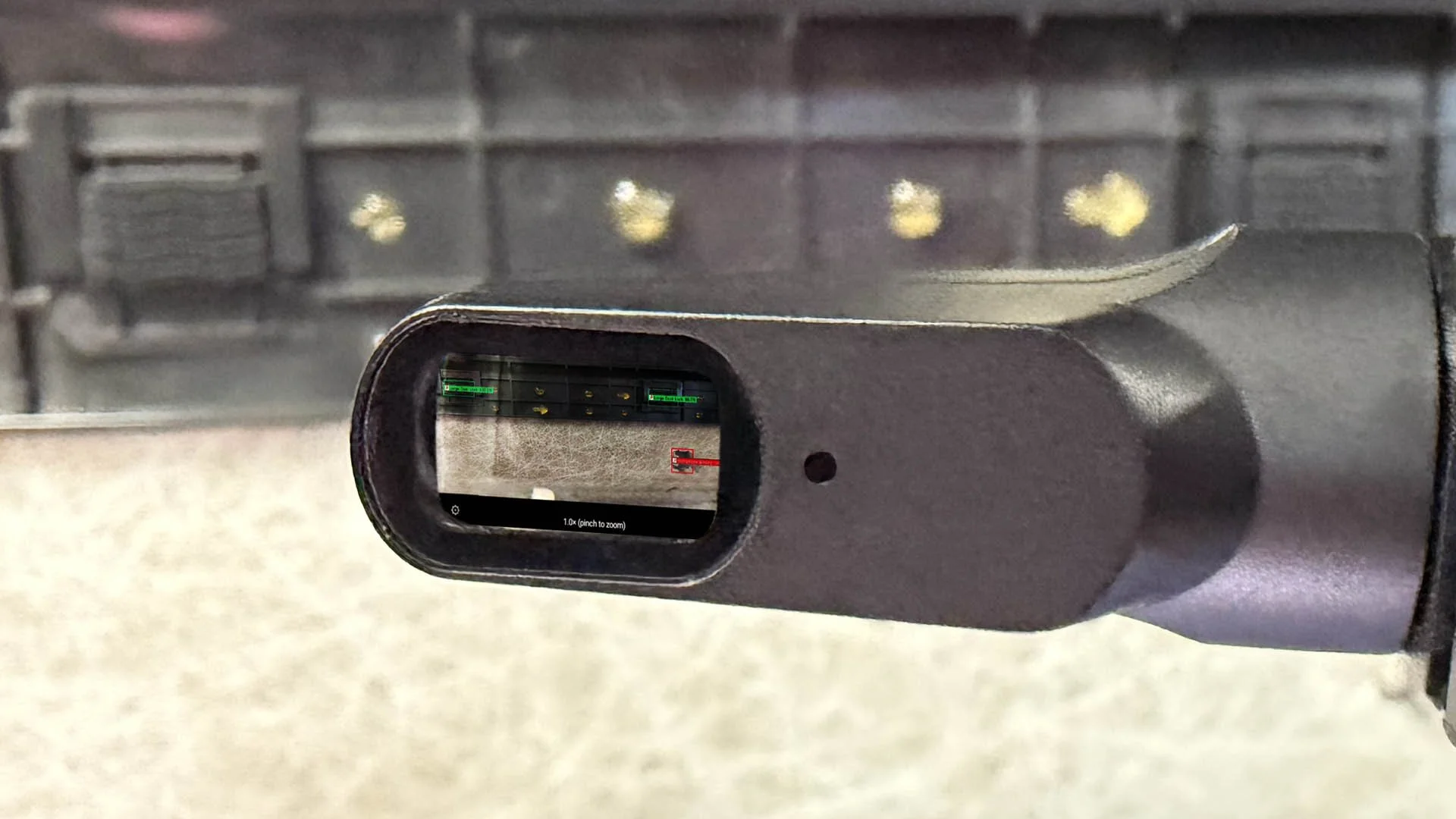
Vuzix smart glasses deliver the full hands-free experience. But Net Mobile isn’t locked to one device — it runs on any hardware that checks three boxes:
OS
android
HAS A
camera
CONNECTS OVER
wi-fi
That opens the door to rugged handhelds, tablets and phones for stations where glasses aren’t the right fit.
What you need
Already running Net Runner? You’re most of the way there.
- Net RunnerBase license
- REST add-on11-002-02-ADD
- Remote-Viewing add-on11-002-09-ADD
- Net Mobile app (per device)11-002-17-ADD
- Vuzix glasses or Android deviceCamera + Wi-Fi
- Local Wi-Fi networkDevice ↔ Runner PC
use cases
where it fits.
Anywhere an operator needs AI inspection results without stopping to look at a screen.
hands-free assembly checks
Verify clips, fasteners, connectors and labels while the operator keeps building.
walk-around inspection
Inspect large parts, fixtures and assemblies that won’t fit in front of a fixed camera.
rework & repair
Confirm the fix is right before the part goes back on the line.
guided work instructions
Push step-by-step prompts into view based on what the AI sees.
operator training
Get new hires up to speed with real-time feedback on every part.
audits & spot checks
Take AI inspection anywhere on the floor for quality audits and containment.
FAQ
QUESTIONS, ANSWERED.
-
No. The device streams directly to your Net Runner PC over your local Wi-Fi network, and results stream straight back. Like every Detect-It product, it’s 100% on-premises.
-
No. Net Mobile runs on any Android device with a camera and Wi-Fi. Vuzix smart glasses give you the hands-free, line-of-sight experience; phones, tablets and rugged handhelds work too.
-
Not at this time. Net Mobile is available for Android devices only.
-
You can but don’t have to. Net Mobile uses the same nets you’ve already built in Net Builder and run in Net Runner.
-
Response time depends on the video feed and the strength of your Wi-Fi at the inspection area. A strong, reliable wireless signal delivers the best experience. We’ll help you evaluate your setup during a demo.
-
Yes. They close the dock connected to their device and select a different net — using the glasses’ buttons, touchpad or paired phone app.
-
Net Runner needs the REST add-on (11-002-02-ADD) and the Remote-Viewing add-on (11-002-09-ADD). Contact us for a quote that includes Net Mobile.
put ai inspection in your
operators’ line of sight.
See Net Mobile on Vuzix smart glasses or mobile devices with your parts and your nets.
Vuzix is a trademark of Vuzix Corporation. Android is a trademark of Google LLC.